

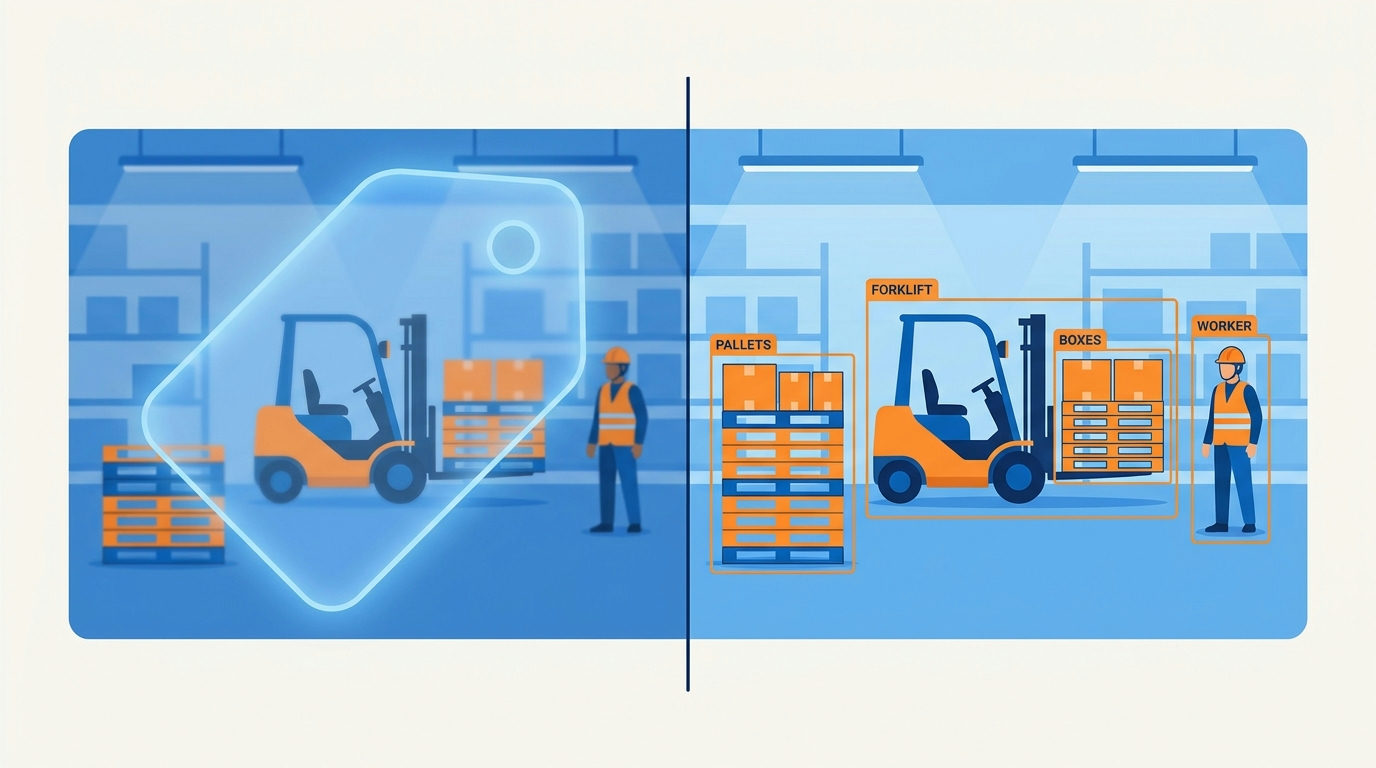
Object detection vs image classification is one of the first decisions in any computer vision project, and picking the wrong task can waste weeks of labelling. Image classification tells you what is in a picture. Object detection tells you what is in the picture and where, by drawing a box around each object it finds. This guide explains the difference in practical terms, shows how the labelling work and evaluation change, and gives a simple way to decide which task your project actually needs.
Object detection vs image classification at a glance
- Image classification takes a whole image and returns one label, or a short list of labels with confidence scores. Example output: “forklift, 0.94”.
- Object detection returns a list of objects, each with a label, a confidence score and a bounding box. Example output: “forklift at (120, 80, 340, 300), 0.91; person at (400, 60, 470, 290), 0.88”.
- Segmentation goes one step further and labels individual pixels, either by class (semantic segmentation) or by object (instance segmentation).
You can see this split in the tools themselves. The torchvision model documentation groups its pre-trained models into separate sections for classification, semantic segmentation, and object detection with instance segmentation and keypoint detection. Each task has its own model families, input expectations and outputs.
What image classification is good at
Classification is the simplest vision task to set up, label and deploy. It works best when an image has one main subject, or when you only need a yes/no answer about the whole frame.
Good fits include:
- Sorting product photos into categories for a catalogue.
- Checking whether a scanned document is an invoice, a receipt or a contract.
- Flagging whether a photo from a production line shows a finished or an unfinished part, when the part fills most of the frame.
- Filtering out blurry or unusable images before they reach a human reviewer.
The labelling is quick: a person looks at each image and picks a category. That simplicity is the main reason to start with classification if it can answer your question.
What object detection adds
Detection is the right task when location matters, when several objects can appear in one image, or when you need to count things. A bounding box, as Google’s machine learning glossary describes it, is the set of coordinates of a rectangle around an area of interest. A detector predicts one of those rectangles for every object it finds, together with a class label.
Good fits include:
- Counting vehicles, pallets or people in a scene.
- Finding where a defect sits on a large part so an inspector can zoom in.
- Checking that required items are present, such as a label, a seal and a barcode on a package.
- Feeding object positions to another system, for example a robot arm that needs to know where to pick.
Common detection model families in torchvision include Faster R-CNN, RetinaNet, SSD and FCOS. The same documentation notes that its detection models start from pre-trained classification backbones, which is one reason detection is heavier to train and run.
How the labelling work changes
The biggest practical difference between the two tasks is the cost of preparing training data.
- Classification labels are one decision per image. A reviewer can often label a large batch in a single session.
- Detection labels need a box drawn around every object of interest in every image, and each box needs a class. Images with many small objects take far longer to label than images with one.
- Consistency rules matter more for detection. Decide in advance how tight the boxes should be, whether to label partly hidden objects, and what to do with objects cut off by the edge of the frame. Write these rules down and share them with every labeller.
Large public datasets show the scale involved. The Microsoft COCO paper describes a dataset of everyday scenes with objects in their natural context, annotated with per-instance segmentations to support precise localisation. That level of annotation is what makes detection and segmentation benchmarks possible, and it is also why custom detection projects need a realistic labelling budget.
How evaluation differs
Classification models are usually judged with accuracy, precision, recall and F1 on a held-out test set. If the classes are imbalanced, precision and recall are more informative than accuracy.
Detection needs an extra idea: how well does a predicted box overlap the real one? The standard measure is intersection over union (IoU), the area where the predicted and true boxes overlap divided by the total area they cover together. A prediction usually counts as correct only if its IoU with a true box passes a chosen threshold and its label is right. Detection results are then summarised as average precision across classes, often reported at more than one IoU threshold so you can see how precise the boxes are, not just whether objects were found.
The practical lesson: do not compare a classifier’s accuracy with a detector’s average precision. They measure different things.
Compute and deployment trade-offs
- Model size and speed. Classification models are generally lighter and faster than detectors built on the same backbone, because a detector does the classifier’s work and then predicts boxes on top.
- Input resolution. Detection of small objects often needs higher-resolution input, which increases memory use and processing time.
- Edge devices. If the model must run on a camera or phone, check that a lightweight detector meets your speed target before committing. Torchvision includes SSDlite, a lighter variant of SSD, alongside its larger detectors.
- Post-processing. Detectors return many overlapping candidate boxes that need filtering before use. Budget time to tune confidence thresholds per class.
A simple decision checklist
- Write the question your system must answer in one sentence. “Is this a damaged parcel?” points to classification. “Where is the damage, and how many dents are there?” points to detection.
- Check how many objects appear per image. One dominant subject suggests classification; several objects suggests detection.
- Ask whether anything downstream needs a location. If a person or machine has to act on a position, you need boxes or masks.
- Estimate labelling time by labelling 50 images both ways. The difference is usually decisive.
- Start with the simpler task when in doubt. A classifier can prove there is a usable signal in your images before you invest in box labels.
- Consider a two-stage design. Some teams run a fast classifier to filter images, then a detector only on the ones that matter.
Object detection vs image classification: a worked scenario
Picture a warehouse team that wants to use camera images to check outgoing pallets. Their first idea is “detect damaged boxes”. Before labelling anything, they write the question down: “Should this pallet be held back for a manual check?” That is a yes/no decision about the whole image, so they start with a classifier trained on a few hundred photos labelled “ship” or “hold”.
After a month, the classifier is catching most problem pallets, but inspectors say they waste time hunting for the damage in each held image. Now location matters to a person downstream, so the team adds a detector that draws boxes around crushed corners and torn wrap, and they run it only on the pallets the classifier holds. Labelling boxes on that smaller set is affordable, and the inspectors get a direct pointer to the problem. This staged approach is often the cheapest way to settle object detection vs image classification in a real project: begin with the whole-image question, then add boxes where they save someone time.
Where to go next
Once you know the task, the next decisions are data collection, augmentation and evaluation. Our computer vision hub covers real-world integration questions, and the machine learning hub explains the training and evaluation basics that apply to both tasks.
Key takeaways
When you weigh object detection vs image classification, remember that image classification answers “what is in this image?” with a label for the whole frame, while object detection answers “what is here and where?” with a labelled box for each object. Classification is cheaper to label, faster to run and easier to evaluate; detection is necessary when you need positions, counts or multiple objects per image. Write down the exact question your system must answer, test the labelling effort on a small sample, and choose the simplest task that answers it.
Written by the TechZone AI Editorial desk.






Leave feedback about this